
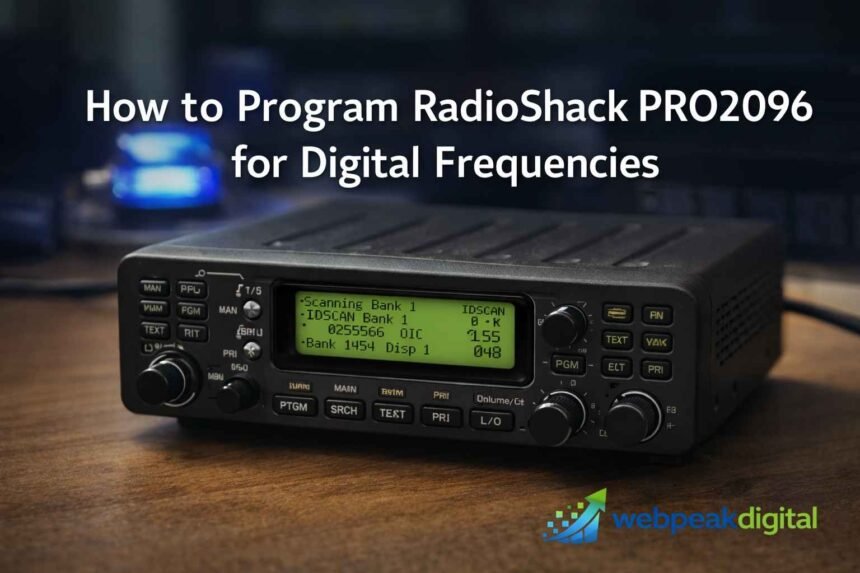
Programming an older digital scanner can feel confusing, especially when documentation is scattered and local radio systems have changed over time. The RadioShack PRO-2096 is still a capable unit in the right conditions, but it requires a clear understanding of how digital systems work and how this specific model was designed to handle them.
This guide focuses on how to program RadioShack PRO2096 for digital frequencies in a practical, realistic way, based on how public safety and digital radio systems actually operate. The goal is to help you avoid common setup mistakes, understand what the scanner can and cannot do, and configure it correctly so you can hear real traffic instead of silence or data noise.
What “Digital Frequencies” Mean on the RadioShack PRO-2096
Digital frequencies on the PRO-2096 refer to radio channels that carry digitally encoded voice instead of traditional analog audio. The scanner decodes the digital signal and converts it into intelligible speech when the format is supported.
Digital vs Analog Scanning Explained
Digital scanning means the scanner processes encoded data streams rather than raw audio signals.
Analog scanning relies on continuous waveforms that directly represent sound.
Key differences in practice:
-
Digital signals sound like noise on analog-only scanners
-
Digital audio is either clear or silent, not gradually noisy
-
Proper mode selection is required for digital decoding
APCO-25 (P25) Phase 1 Compatibility
The PRO-2096 supports APCO-25 Phase 1 digital voice.
This is the most common digital format used by public safety systems during the scanner’s active years.
Operational notes:
-
Uses C4FM digital modulation
-
Works on both conventional and trunked systems
-
Does not support Phase 2 or TDMA-based systems
What the PRO-2096 Can and Cannot Decode
The PRO-2096 can decode specific digital formats but has clear limits.
Understanding these limits prevents wasted programming effort.
Supported:
-
P25 Phase 1 digital voice
-
Analog FM and AM
-
Mixed analog/digital trunked systems
Not supported:
-
P25 Phase 2
-
DMR, NXDN, or encrypted traffic
How the RadioShack PRO-2096 Handles Digital Signals
The PRO-2096 processes digital signals differently depending on whether the system is conventional or trunked. The internal logic changes based on how the channel data is structured.
Conventional Digital Channel Processing
Conventional digital channels are handled as single, fixed frequencies.
The scanner listens directly to one channel and decodes voice when present.
Operational behavior:
-
One frequency equals one channel
-
No talk group logic involved
-
Easier to program and troubleshoot
Trunked System Control Channel Logic
Trunked systems rely on a control channel that manages all voice traffic.
The scanner follows instructions from this data stream to jump between frequencies.
Key mechanics:
-
Control channel carries system data, not voice
-
Voice channels change dynamically
-
Scanner must track the system continuously
Talkgroups vs Frequencies Explained
Talkgroups are virtual channels within a trunked system.
They replace fixed frequencies as the primary way users are grouped.
Practical distinction:
-
Frequencies carry the signal
-
Talk groups define who is talking
-
Both must be programmed correctly for audio
What You Need Before Programming the PRO-2096
Successful programming depends on having accurate system data before touching the keypad. Guessing or partial information leads to silent scanning.
Required Frequency and System Information
You need specific technical details for the target system.
Without them, the scanner cannot follow digital traffic.
Required data:
-
Frequencies or control channels
-
System type (conventional or trunked)
-
Talk group IDs for trunked systems
Identifying System Type (Conventional vs Trunked)
Every digital system falls into one of two categories.
Programming steps change completely based on this classification.
How to identify:
-
Single frequency listings usually mean conventional
-
Control channels and talk groups indicate trunking
-
Public safety databases label system type clearly
Checking Local Digital System Compatibility
Not all local systems are compatible with the PRO-2096.
Verifying compatibility avoids chasing unsupported formats.
Checklist:
-
Confirm P25 Phase 1 usage
-
Check for encryption flags
-
Verify system is still active
How to Program Conventional Digital Frequencies Manually
Programming conventional digital channels is the simplest use case for the PRO-2096. The scanner treats these channels much like analog ones, with digital decoding enabled.
Selecting and Preparing a Scanner Bank
Each frequency must be stored in an active bank.
Banks must be cleared or reviewed before adding new channels.
Preparation steps:
-
Choose an unused bank
-
Clear conflicting entries
-
Enable bank scanning
Entering Digital Frequencies Step by Step
Frequencies are entered directly through the keypad.
The scanner automatically detects digital voice when supported.
Basic steps:
-
Enter program mode
-
Input frequency
-
Store and confirm channel
Verifying Digital Audio Reception
Successful programming results in clean, decoded audio.
Verification ensures the system is configured correctly.
What to check:
-
Scanner stops on the channel
-
Digital audio is intelligible
-
No constant noise or silence
How to Program P25 Trunked Systems on the PRO-2096
Programming trunked systems requires a different approach. The scanner must be configured to follow system logic rather than individual channels.
Programming Control Channel Frequencies
Only control channels are required for most P25 systems.
The scanner learns voice channels automatically.
Steps involved:
-
Identify control channels
-
Enter them into one bank
-
Ignore voice-only frequencies
Setting the Correct Trunking Mode
The bank must be set to the proper trunking format.
Incorrect mode selection prevents system tracking.
Key settings:
-
Motorola or P25 mode
-
Control-channel-only operation
-
Bank-level trunking assignment
Adding and Managing Talkgroup IDs
Talkgroups determine which conversations are heard.
Without them, the scanner may remain silent.
Management basics:
-
Enter known talkgroup IDs
-
Use open or closed mode intentionally
-
Label talkgroups for clarity
Manual Programming vs Software Programming Methods
The PRO-2096 supports both keypad and software-based programming. Each approach serves different operational needs.
When Manual Programming Makes Sense
Manual entry is effective for small or simple setups.
It also helps with troubleshooting and quick changes.
Best use cases:
-
Single conventional channels
-
Field adjustments
-
Learning scanner behavior
Advantages of Using Programming Software
Software simplifies complex system management.
It reduces errors and speeds up configuration.
Practical benefits:
-
Bulk data entry
-
Easy backups
-
Direct database imports
Common Limitations of Each Method
Both methods have trade-offs that affect usability.
Choosing the wrong one can slow setup.
Limitations:
-
Manual entry is time-consuming
-
Software requires cables and drivers
-
Errors transfer easily if unchecked
Programming the PRO-2096 Using Win96 Software
Win96 is a widely used programming tool for the PRO-2096. It mirrors the scanner’s memory structure and simplifies digital system setup.
Required Cables and Computer Setup
A compatible programming cable is required.
The computer must recognize the scanner correctly.
Setup requirements:
-
USB or serial programming cable
-
Proper drivers installed
-
Correct COM port selection
Importing Digital System Data
System data can be loaded into the software interface.
This avoids manual frequency and talkgroup entry.
Import workflow:
-
Load system file or database data
-
Review frequencies and talkgroups
-
Adjust bank assignments
Uploading Configurations to the Scanner
Once configured, data is sent directly to the scanner.
The scanner overwrites existing memory in selected banks.
Final steps:
-
Connect scanner
-
Upload configuration
-
Restart and test scanning
Common Programming Mistakes That Prevent Digital Reception
Most reception failures are caused by configuration errors, not hardware faults. These mistakes are predictable and avoidable.
Treating Trunked Systems as Conventional Channels
This is the most common error.
Entering voice frequencies without control channels breaks tracking.
Why it fails:
-
Scanner cannot follow system logic
-
Voice channels change constantly
-
No talkgroup routing occurs
Incorrect Bank or Mode Configuration
Banks must match the system type exactly.
One incorrect setting disables decoding.
Typical issues:
-
Wrong trunking mode
-
Bank not enabled
-
Mixed system types in one bank
Signal Strength and Attenuation Issues
Digital decoding is sensitive to signal quality.
Weak or distorted signals prevent proper decode.
Common causes:
-
Attenuation enabled accidentally
-
Poor antenna placement
-
Indoor interference sources
Why You May Hear Noise but No Digital Audio
Hearing noise usually means the scanner is receiving data but not decoding voice. This points to a configuration or compatibility issue.
Control Channel “Data Buzz” Explained
The buzzing sound is raw control channel data.
It confirms signal presence but not usable audio.
What it indicates:
-
Correct frequency
-
Missing trunking configuration
-
Scanner not tracking system
Unsupported Digital Formats and Encryption
Some digital signals cannot be decoded at all.
Encryption and newer standards block audio completely.
Common examples:
-
Encrypted talkgroups
-
Phase 2-only systems
-
Proprietary digital formats
Verifying Active Talk groups
Silence may mean the talk group is inactive.
Not all programmed IDs carry constant traffic.
Verification steps:
-
Monitor in open mode
-
Check recent activity logs
-
Compare multiple talk groups
Best Practices for Reliable Digital Scanning on the PRO-2096
Consistent performance depends on organization, signal quality, and realistic expectations. Small adjustments make a measurable difference.
Organizing Banks and Talkgroups Efficiently
Clear structure improves usability and troubleshooting.
Disorganized banks lead to missed traffic.
Best practices:
-
One system per bank
-
Logical talkgroup grouping
-
Clear alpha tags
Optimizing Antenna and Signal Placement
Digital signals require stable reception.
A better antenna often solves decode issues.
Practical tips:
-
Use an external antenna when possible
-
Avoid metal obstructions
-
Test multiple locations
Maintaining Stable Digital Decode Performance
Digital decoding depends on clean signal input.
Minor interference can disrupt audio.
Stability factors:
-
Disable unnecessary attenuation
-
Reduce nearby RF noise
-
Keep firmware and settings consistent
PRO-2096 Compared to Newer Digital Scanners
The PRO-2096 reflects an earlier generation of digital scanning. It remains usable, but expectations must align with modern systems.
Digital Standards Supported vs Modern Models
New scanners support a wider range of formats.
The PRO-2096 focuses on legacy digital standards.
Comparison highlights:
-
PRO-2096: P25 Phase 1 only
-
New models: Phase 2, DMR, NXDN
-
Modern scanners handle encryption indicators better
When the PRO-2096 Is Still a Good Choice
The scanner remains effective in specific scenarios.
It performs well on compatible systems.
Good fit if:
-
Local systems use P25 Phase 1
-
No encryption is present
-
Simpler monitoring needs exist
Situations Where an Upgrade Is Required
Some environments exceed the scanner’s capabilities.
No amount of programming can overcome format limits.
Upgrade needed when:
-
Systems use Phase 2
-
Encryption is widespread
-
Multiple digital formats are required