
Turning an existing image into a usable game sprite used to mean hours of manual cleanup, slicing, and trial-and-error. Today, that workflow is changing fast as teams look for ways to move from idea to playable assets without slowing production.
An ai image to sprite generator import image solves a very practical problem: how to take artwork you already have and convert it into sprites or sprite sheets that actually work inside a game or animation pipeline. Instead of redrawing assets from scratch, creators can reuse images, apply consistent structure, and focus effort where it matters most—gameplay, motion, and polish.
This approach is less about replacing artists and more about removing friction. When image import is done correctly, AI-based sprite generation becomes a reliable operational tool rather than an experimental shortcut.
What Is an AI Image to Sprite Generator?
An AI image to sprite generator is a system that converts imported images into sprites or sprite sheets using automated visual analysis.
It replaces much of the manual work traditionally required to prepare game-ready assets.
These tools are designed for operational efficiency, not artistic storytelling.
They focus on structure, consistency, and technical usability.
Definition and Core Capabilities
An AI image to sprite generator transforms static images into reusable sprite assets.
It applies machine learning models to detect shapes, motion patterns, and layout rules.
Core capabilities usually include:
-
Image import and preprocessing
-
Automatic subject isolation
-
Frame or sprite sheet generation
-
Export in engine-compatible formats
Difference Between Sprites and Sprite Sheets
A sprite is a single image asset, while a sprite sheet is a structured collection of multiple sprites.
Sprite sheets are used to animate characters efficiently.
In practical terms:
-
Sprites represent one state or pose
-
Sprite sheets store animation frames
-
Engines render sprite sheets more efficiently than loose images
How AI-Based Generation Differs From Manual Sprite Creation
AI-based generation automates detection and slicing that humans traditionally perform by hand.
Manual workflows rely on drawing skill and frame-by-frame editing.
The difference shows up in:
-
Time required to create assets
-
Level of artistic control
-
Consistency across large asset sets
Who Uses AI Image to Sprite Generators and Why
These tools are used by professionals and non-professionals who need usable sprite assets quickly.
The motivation is usually speed, scale, or lack of specialized art resources.
Use cases vary, but the operational goal is the same.
Reduce effort while maintaining acceptable quality.
Game Developers and Indie Studios
Game developers use these tools to accelerate asset pipelines.
They are especially common in early development and small teams.
Typical reasons include:
-
Rapid character animation creation
-
Reduced dependency on dedicated artists
-
Faster iteration during gameplay testing
Designers and Animators
Designers use sprite generators to turn visual concepts into motion-ready assets.
This avoids repetitive frame construction.
Common applications:
-
UI motion elements
-
Interactive prototypes
-
Animation drafts for review
Hobbyists and No-Code Creators
Hobbyists use these tools to build games or animations without technical depth.
They remove barriers to entry.
These users typically want:
-
Simple upload-based workflows
-
Minimal configuration
-
Immediate visual output
How Importing an Image Into an AI Sprite Generator Works
Image import is the foundation of AI-based sprite generation.
The quality of the input image directly determines the quality of the output.
The process follows a predictable pipeline.
Each stage builds on the previous one.
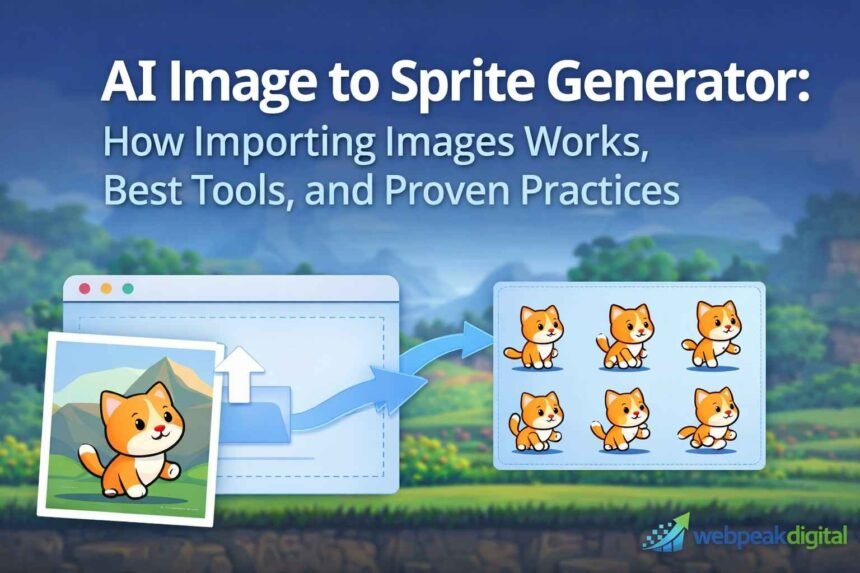
Image Upload and Pre-Processing
The system first accepts the image and prepares it for analysis.
This step standardizes the input.
Common actions include:
-
Resizing to supported dimensions
-
Normalizing colors and brightness
-
Reducing noise or compression artifacts
AI Detection, Segmentation, and Style Mapping
The AI identifies subjects and separates them from the background.
It then applies a visual style model.
This stage handles:
-
Edge detection
-
Component separation
-
Mapping to pixel or high-resolution styles
Frame Generation and Sprite Sheet Assembly
Frames are generated based on inferred or predefined motion patterns.
These frames are then arranged into a structured layout.
Typical outputs include:
-
Individual animation frames
-
Grid-based sprite sheets
-
Uniform spacing for engine compatibility
Supported Image Formats, Sizes, and Quality Requirements
AI sprite generators rely on standard image inputs.
However, not all images produce usable results.
Technical constraints matter.
Ignoring them leads to poor output.
Common Input Formats (PNG, JPG, WebP, GIF)
Most tools support widely used image formats.
PNG is preferred for transparency.
General format behavior:
-
PNG preserves edges and alpha channels
-
JPG works for references, not final output
-
WebP balances size and quality
-
GIF may be used for motion reference
Resolution and Aspect Ratio Guidelines
Resolution affects detail and clarity.
Extreme aspect ratios reduce accuracy.
Best practices include:
-
Medium to high-resolution images
-
Consistent dimensions across assets
-
Avoiding overly tall or wide frames
Background Transparency and Contrast Considerations
Clear separation improves detection accuracy.
Busy backgrounds confuse segmentation models.
Recommended conditions:
-
Transparent or solid backgrounds
-
High contrast between subject and background
-
Minimal overlapping elements
Why Image Import Matters in AI Sprite Generation
Image import allows teams to reuse existing visual material.
This reduces redundant work and accelerates production.
It also improves consistency.
The same visual reference can drive multiple assets.
Faster Asset Creation for Production Pipelines
Importing images removes the need to redraw assets.
This shortens delivery timelines.
Operational benefits include:
-
Faster iteration cycles
-
Lower production costs
-
Reduced artist workload
Style Consistency Across Characters and Objects
Using imported images anchors visual style.
This prevents inconsistency across assets.
Consistency is maintained by:
-
Reusing reference imagery
-
Applying uniform style settings
-
Avoiding mixed source material
Reduced Manual Editing and Rework
Automated generation handles repetitive tasks.
Manual effort shifts to refinement only.
This results in:
-
Fewer alignment issues
-
Cleaner base assets
-
More predictable output
Key Benefits of AI Image to Sprite Generators
The primary benefit is operational efficiency.
Quality is acceptable when inputs are controlled.
These tools are not replacements for artists.
They are force multipliers.
Benefits for Game Development Teams
Teams gain speed without increasing headcount.
This is critical in small or early-stage projects.
Key advantages:
-
Faster content production
-
Standardized outputs
-
Easier collaboration
Benefits for Solo Creators and Indie Projects
Solo creators can produce complete asset sets independently.
This lowers financial and technical barriers.
They benefit from:
-
Self-sufficiency
-
Shorter development cycles
-
Reduced outsourcing needs
Benefits for Rapid Prototyping and Testing
Prototypes require functional visuals, not final polish.
AI sprite generation fits this requirement.
It supports:
-
Quick gameplay validation
-
Visual placeholders
-
Early user feedback
Best Practices for Importing Images to Get High-Quality Sprites
Output quality is determined before upload.
Preparation matters more than tool choice.
Best practices focus on control and review.
Automation should not remove oversight.
Preparing Images Before Upload
Clean inputs produce predictable results.
Preparation reduces correction later.
Preparation steps:
-
Crop tightly around the subject
-
Remove unnecessary background detail
-
Normalize lighting and color
Choosing the Right Style and Output Settings
Settings determine usability.
Incorrect choices create unusable assets.
Key considerations:
-
Match style to project art direction
-
Select correct frame counts
-
Avoid mixing output types
Validating Results Before Export
Reviewing outputs prevents pipeline issues.
Errors compound when ignored.
Validation should confirm:
-
Frame consistency
-
Proper alignment
-
Engine compatibility
Technical and Licensing Considerations
AI tools introduce legal and data considerations.
These are often overlooked.
Responsibility remains with the user.
Automation does not remove accountability.
Ownership and Rights of Imported Images
Users must own or license their inputs.
Most tools do not assume liability.
Key points:
-
Avoid copyrighted materials
-
Keep proof of ownership
-
Document source usage
Commercial Use and Asset Licensing
Licensing terms vary by platform and plan.
Free tiers often restrict usage.
Always check:
-
Commercial permissions
-
Attribution requirements
-
Redistribution limits
Data Privacy and Image Storage Policies
Uploaded images may be stored externally.
This affects sensitive projects.
Risk controls include:
-
Reviewing retention policies
-
Avoiding confidential assets
-
Using offline tools when necessary
Common Mistakes and Risks When Using AI Sprite Generators
Most issues stem from poor inputs or lack of review.
AI amplifies mistakes as easily as successes.
Understanding risks prevents wasted effort.
Controls should be intentional.
Low-Quality Source Images
AI cannot invent missing detail.
Low-quality inputs limit output quality.
Common problems:
-
Blurry images
-
Heavy compression
-
Visual noise
Over-Automation Without Manual Review
Automation does not replace judgment.
Unchecked outputs cause downstream issues.
Risks include:
-
Animation glitches
-
Inconsistent sizing
-
Visual artifacts
Mismatched Output Formats for Game Engines
Not all outputs are engine-ready.
Format mismatch causes import failures.
Examples:
-
Incorrect sprite sheet layout
-
Unsupported scaling
-
Missing metadata
Popular Tools That Support AI Image-to-Sprite Import
Tool choice affects workflow efficiency.
Capabilities vary widely.
Selection should be based on use case.
Not popularity.
Online AI Sprite Generators
Web-based tools prioritize ease of use.
They suit small projects and experiments.
Typical features:
-
Browser-based upload
-
Limited customization
-
Quick exports
Game-Engine-Friendly Sprite Tools
Some tools integrate directly with engines.
They reduce manual setup.
Advantages include:
-
Engine-ready formats
-
Animation presets
-
Metadata support
Free vs Paid Tool Capabilities
Free tools have constraints.
Paid tools offer control and scale.
Differences often include:
-
Resolution limits
-
Commercial rights
-
Batch processing
Image to Sprite Generation Techniques and Approaches
Different techniques serve different needs.
No single method fits all projects.
Understanding approaches improves outcomes.
Technique selection matters.
Single Image to Multi-Frame Sprite Conversion
This method predicts motion from one image.
It suits simple animations.
Best used for:
-
Idle loops
-
Stylized motion
-
Prototypes
Reference-Based Sprite Generation
Multiple images guide generation.
This improves consistency.
Used for:
-
Character sets
-
Equipment variations
-
Themed asset groups
Pixel Art vs High-Resolution Sprite Techniques
Pixel art prioritizes clarity.
High-resolution sprites prioritize detail.
The choice depends on:
-
Platform performance
-
Visual direction
-
Production constraints
Step-by-Step Checklist for Importing Images Into AI Sprite Tools
Checklists reduce errors.
They enforce consistency.
This approach supports repeatable outcomes.
Especially in team environments.
Pre-Upload Checklist
Preparation prevents rework.
Confirm:
-
Correct resolution
-
Clean background
-
Clear subject framing
In-Tool Configuration Checklist
Settings define usability.
Verify:
-
Style alignment
-
Frame count
-
Export format
Post-Export Validation Checklist
Validation ensures readiness.
Check for:
-
Frame alignment
-
Animation smoothness
-
File organization
AI Image to Sprite Generator vs Traditional Sprite Creation
Both methods have valid use cases.
The choice depends on priorities.
Speed and control are the main trade-offs.
Neither replaces the other entirely.
Speed and Cost Comparison
AI generation is faster and cheaper at scale.
Manual creation is slower and more expensive.
In practice:
-
AI suits volume work
-
Manual suits critical assets
Quality and Customization Trade-Offs
AI limits fine control.
Manual work allows precision.
Trade-offs include:
-
Speed versus detail
-
Automation versus intent
-
Consistency versus creativity
When Manual Sprite Design Is Still Better
Manual design remains essential for flagship visuals.
High-impact assets need human judgment.
Examples include:
-
Main characters
-
Narrative animations
-
Brand-defining visuals
Frequently Asked Questions
Can I import my own images into an AI image to sprite generator?
Yes. Most modern tools allow you to upload your own images as the starting point for sprite generation. You must own the image or have proper usage rights, and the image needs to meet basic format, size, and quality requirements for reliable results.
Do AI sprite generators work for animations and sprite sheets?
Yes. Many tools generate multiple frames and automatically arrange them into sprite sheets suitable for animation. The quality depends on the input image, selected settings, and whether the tool supports motion inference or frame sequencing.
Are AI-generated sprites suitable for commercial projects?
They can be, but only if the tool’s license explicitly allows commercial use. You should always review usage rights, redistribution limits, and attribution rules before using AI-generated sprites in paid games or products.
What type of images produce the best sprite results?
Images with clear subjects, high contrast, minimal background clutter, and consistent lighting produce the most reliable sprites. Clean inputs reduce segmentation errors and minimize the need for manual fixes.