
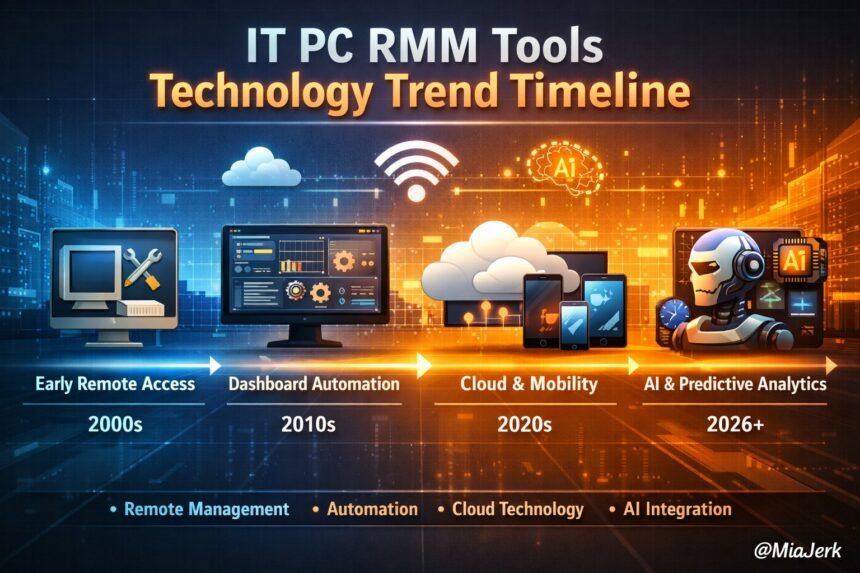
Remote Monitoring and Management (RMM) has become a cornerstone of modern IT operations, enabling teams to monitor, maintain, and secure endpoints without constant on-site intervention. The IT PC RMM tools technology trend timeline illustrates how these platforms have evolved from basic remote access utilities to sophisticated systems powered by automation, cloud capabilities, and AI-driven analytics. Understanding this evolution helps IT professionals, MSPs, and business leaders grasp the benefits of RMM and make informed decisions about adopting the right tools for their environments.
Beyond monitoring and maintenance, RMM platforms play a vital role in enhancing operational efficiency, reducing downtime, and supporting hybrid or remote workforces. By centralizing system oversight and integrating with helpdesk and ITSM workflows, these tools provide actionable insights and proactive management capabilities. This enables organizations to respond faster to incidents, maintain compliance, and optimize IT resources across all endpoints.
Understanding IT PC RMM Tools
What Are RMM Tools and How Do They Function?
RMM tools are software platforms designed to monitor, manage, and maintain IT systems remotely.
- They track hardware, software, network health, and endpoints.
- Alerts are generated automatically for issues like system errors, vulnerabilities, or downtime.
- Automation can resolve minor problems without manual intervention.
- Reporting dashboards provide centralized insights into IT performance.
Key Components of a Modern RMM Platform
A modern RMM platform typically includes:
- Monitoring Agents: Installed on endpoints for real-time data collection.
- Centralized Dashboard: Displays system status, alerts, and reports.
- Automation Engine: Executes scripts, patches, or routine tasks automatically.
- Integrations: Connects to ITSM, ticketing systems, and security platforms.
- Analytics and Reporting: Provides trend analysis, uptime metrics, and predictive insights.
Who Uses RMM Tools and Why
RMM tools are used by IT teams, MSPs, and organizations managing multiple endpoints.
- IT Teams: Monitor internal networks and reduce manual work.
- MSPs: Provide remote support to clients efficiently.
- Enterprises: Ensure system uptime, security, and compliance.
- Small Businesses: Automate monitoring without hiring dedicated IT staff.
How RMM Tools Work in IT Management
Remote Monitoring Processes Explained
RMM tools continuously track system health and network activity.
- Agents on devices collect metrics such as CPU usage, disk space, and software updates.
- Dashboards display alerts in real time.
- Teams receive notifications via email or mobile apps for critical issues.
Automated Maintenance and Patch Management
RMM platforms schedule updates and fixes automatically.
- Security patches can be deployed across multiple endpoints simultaneously.
- Scripts automate repetitive tasks like disk cleanup or system checks.
- Scheduled maintenance minimizes system downtime during business hours.
Integrations with Helpdesk and ITSM Systems
RMM tools integrate seamlessly with ticketing systems.
- Alerts can auto-generate tickets for IT teams.
- Integration ensures incident tracking and SLA compliance.
- Enables streamlined workflow between monitoring, resolution, and reporting.
The Evolution of RMM Technology
Early Remote Access and Monitoring Tools
Early RMM solutions focused on simple remote access.
- Tools like VNC and Remote Desktop allowed basic monitoring.
- Alerting was limited to uptime checks.
- Manual maintenance was common and time-consuming.
Centralized Dashboards and Automation in the 2010s
Modern RMM systems introduced dashboards and automation.
- Centralized views enabled MSPs to manage multiple clients efficiently.
- Automation reduced repetitive tasks, like patching and reporting.
- Integration with helpdesk systems became standard.
AI and Predictive Analytics in Modern RMM
Today, RMM platforms leverage AI for proactive IT management.
- Predictive alerts identify potential failures before they occur.
- Machine learning optimizes alert thresholds to reduce false positives.
- Analytics track trends, helping plan capacity and maintenance cycles.
Roles and Responsibilities of RMM Users
MSPs vs In-House IT Teams
MSPs provide RMM services to multiple clients, while in-house IT teams focus on internal infrastructure.
- MSPs manage client endpoints remotely and often support 24/7 operations.
- In-house teams focus on maintaining internal networks, applications, and compliance.
- Both roles require monitoring, maintenance, and reporting skills.
Security and Compliance Oversight
RMM users ensure systems remain secure and compliant.
- Monitor for unauthorized access or suspicious activity.
- Enforce data privacy regulations, such as GDPR or HIPAA.
- Keep audit trails for accountability and legal requirements.
Reporting and Decision-Making Tasks
RMM dashboards provide actionable insights for decision-making.
- IT teams review uptime metrics, patch deployment, and system performance.
- Reports guide resource allocation and capacity planning.
- Helps identify trends for cost savings and operational efficiency.
Why RMM Tools Matter for Businesses
Improving IT Efficiency and Response Times
RMM tools streamline IT operations and reduce manual workload.
- Automated alerts allow immediate issue resolution.
- Teams spend less time on repetitive tasks.
- Monitoring multiple endpoints simultaneously improves efficiency.
Minimizing Downtime and Operational Disruption
Downtime is minimized with proactive monitoring.
- Predictive alerts prevent system failures before they occur.
- Automated patching reduces security risks that could disrupt operations.
- Ensures critical business applications remain available.
Supporting Remote and Hybrid Workforces
RMM tools support employees working outside traditional offices.
- Enables monitoring of laptops, mobile devices, and cloud resources.
- Remote issue resolution minimizes the requirement for physical IT visits.
- Maintains consistent IT performance across locations.
Key Benefits of Using RMM Tools
For IT Administrators and Teams
- Simplifies endpoint management and monitoring.
- Reduces workload with automated maintenance tasks.
- Enhances visibility into system performance and issues.
For Business Leaders and Decision-Makers
- Provides insights for operational planning.
- Reduces risk of downtime and productivity loss.
- Supports strategic IT investments with data-driven analysis.
For End Users and Clients
- Improves overall system reliability.
- Reduces delays caused by technical problems.
- Provides faster support response when issues arise.
Best Practices for Implementing RMM
Choosing the Right RMM Platform
- Evaluate feature sets, scalability, and integration capabilities.
- Consider platform security and compliance certifications.
- Assess vendor support and update frequency.
Optimizing Configurations and Alerts
- Configure thresholds to minimize false alarms.
- Prioritize alerts for critical systems and endpoints.
- Regularly review and adjust monitoring settings.
Ensuring Continuous Training and Updates
- Train IT staff on platform features and automation.
- Stay updated with vendor releases and security patches.
- Encourage knowledge sharing across teams for best practices.
Compliance, Security, and Regulatory Considerations
Data Privacy and GDPR Implications
- RMM tools must handle sensitive data responsibly.
- Monitor data storage, transmission, and access.
- Maintain records to meet regulatory reporting requirements.
Cybersecurity Integration and Threat Mitigation
- Integrate antivirus, endpoint detection, and firewall controls.
- Monitor network traffic for suspicious patterns.
- Apply patches and updates promptly to reduce vulnerabilities.
Maintaining Audit Trails and Reports
- Keep detailed logs of monitoring activity and changes.
- Use reports for internal audits and compliance checks.
- Document incident responses to support accountability.
Common Challenges and Mistakes
Misconfigurations and Overlooked Alerts
- Improperly set thresholds can create missed alerts.
- Lack of standardized configurations leads to inconsistent monitoring.
- Regular reviews prevent unnoticed system issues.
Overreliance on Automation Without Oversight
- Automation cannot fully replace human monitoring.
- Critical decisions require manual verification.
- Balance automated actions with human oversight.
Integration Issues with Existing IT Systems
- RMM tools may conflict with legacy applications.
- Testing integrations before deployment avoids operational disruption.
- Use compatible APIs and connectors where possible.
Tools, Systems, and Techniques in RMM
Top RMM Platforms in 2026
- ConnectWise Automate – strong automation and MSP focus.
- SolarWinds RMM – centralized dashboards with scalable monitoring.
- Kaseya VSA – robust endpoint management and security features.
- NinjaRMM & Atera – cloud-native and easy deployment for small businesses.
Automation Scripts and Workflow Management
- Automate repetitive tasks like patching, backups, and disk cleanup.
- Create workflows for common incidents to reduce resolution times.
- Document scripts and standard operating procedures for consistency.
Emerging AI and Cloud-Based Capabilities
- Predictive analytics forecast system failures.
- AI-driven alerts reduce false positives.
- Cloud RMM platforms enable centralized, multi-location monitoring.
Actionable Checklists for RMM Success
Pre-Deployment Checklist
- Inventory endpoints and software versions.
- Ensure network and security configurations are compatible.
- Set monitoring policies and alert thresholds.
Daily Monitoring and Maintenance Checklist
- Review alerts and system health dashboards.
- Confirm patch deployments and updates.
- Track performance metrics and anomalies.
Incident Response and Recovery Checklist
- Identify affected systems immediately.
- Execute pre-configured remediation scripts.
- Document the incident and steps taken for audit purposes.
Comparing RMM Approaches and Alternatives
RMM vs Traditional IT Monitoring
- RMM provides remote, automated, and proactive management.
- Traditional monitoring often relies on manual checks and reactive fixes.
- RMM reduces response times and operational overhead.
Cloud-Based vs On-Premise RMM Solutions
- Cloud RMM offers scalability, accessibility, and simplified updates.
- On-premise RMM provides full control over infrastructure and data.
- Selection depends on compliance, security, and IT strategy.
Open-Source vs Commercial RMM Platforms
- Open-source platforms offer flexibility and lower cost but require expertise.
- Commercial platforms provide support, reliability, and integrated features.
- Evaluate trade-offs between cost, control, and operational efficiency.
Frequently Asked Questions (FAQs)
What is the IT PC RMM tools technology trend timeline and why does it matter?
The IT PC RMM tools technology trend timeline shows how remote monitoring and management platforms have evolved over the years. It highlights key innovations, such as automation, AI-driven analytics, and cloud-based monitoring, helping IT teams and businesses understand the tools’ capabilities and plan for future IT strategies.
How do RMM tools improve day-to-day IT operations?
RMM tools streamline monitoring, automate routine maintenance, and provide real-time alerts. This reduces manual workload, prevents downtime, and ensures systems run efficiently, allowing IT teams to focus on strategic tasks instead of constant troubleshooting.
Can small businesses benefit from RMM platforms?
Yes, small businesses gain from RMM by centralizing endpoint management and automating maintenance. Even without large IT departments, they can monitor multiple devices, secure systems, and quickly respond to technical issues, improving operational reliability.
What trends are shaping RMM technology in 2026 and beyond?
Current trends include AI-powered predictive maintenance, cloud-native solutions, IoT endpoint integration, and enhanced security features. Automation and analytics continue to evolve, making RMM platforms smarter and more capable of proactive IT management.
How secure are modern RMM tools?
Modern RMM tools are secure when properly configured. They include role-based access control, encryption, multi-factor authentication, and continuous monitoring to prevent unauthorized access. Regular updates and patches further enhance platform security.