
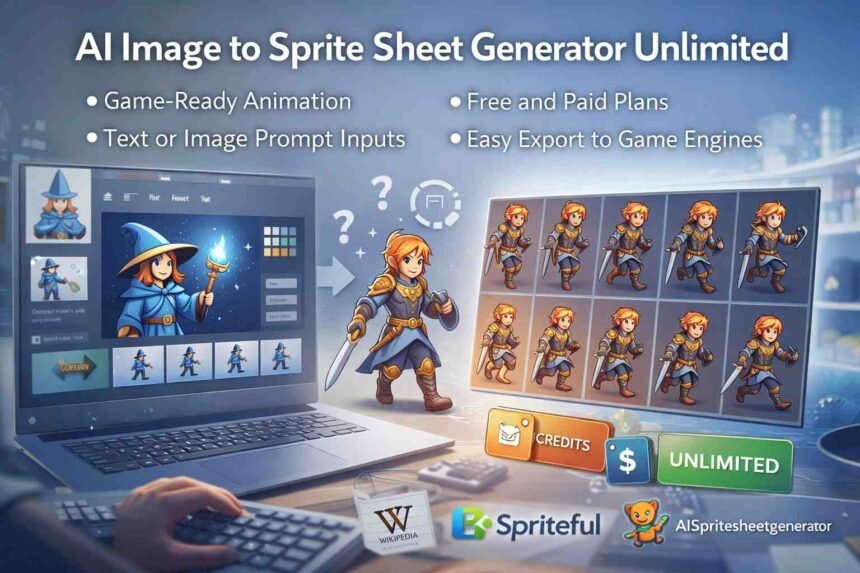
AI image to sprite sheet generator unlimited tools are becoming a practical part of modern animation and game development workflows. Instead of drawing or slicing frames by hand, teams can now turn a single image or visual idea into a usable sprite sheet in minutes. This shift is less about novelty and more about solving real production constraints.
The growing interest in these tools reflects how animation work is changing. Smaller teams need to move faster, prototypes need to be visual early, and asset creation can no longer block development timelines. AI-driven sprite generation fits into this reality by reducing manual effort while still producing assets that can be tested, refined, and shipped.
At the same time, there is confusion around what these tools actually do and what “unlimited” access really means. Not every generator works the same way, and usage limits, licensing terms, and output quality vary widely. Understanding how these systems operate helps teams decide when they are useful and when traditional methods still make more sense.
This guide breaks down how AI image-to-sprite sheet generation works, who uses it, where it adds value, and what to watch for before relying on it in production.
What Is an AI Image to Sprite Sheet Generator?
An AI image to sprite sheet generator is a system that automatically turns a single image or concept into a structured animation grid.
It replaces manual frame-by-frame drawing with model-driven motion generation.
The core value is speed, consistency, and accessibility for animation workflows.
Definition and core concept
An AI image to sprite sheet generator converts static visuals into animated frame sequences.
The AI predicts motion rather than copying existing frames.
Key characteristics:
-
Uses machine learning to infer movement
-
Generates sequential animation frames
-
Outputs a single structured sprite sheet
Types of sprite sheets produced
AI generators support multiple sprite sheet formats depending on the animation goal.
The format directly affects engine compatibility and performance.
Common types include:
-
Character movement cycles (walk, run, idle)
-
Action-based animations (attack, jump, effects)
-
Stylized pixel art or high-resolution 2D sprites
Common use cases across industries
These tools are used wherever repetitive animation would otherwise require manual effort.
They support both production and early-stage experimentation.
Typical use cases:
-
Game asset creation
-
UI and interface animation testing
-
Educational demonstrations and simulations
How AI Converts Images Into Sprite Sheets
AI converts images into sprite sheets by analyzing visual structure and simulating motion across frames.
The process is automated but follows predictable technical steps.
Understanding this workflow helps users control quality and output reliability.
Input methods: image upload vs text prompts
AI generators accept visual references or written instructions.
Each method offers different levels of control.
Primary input methods:
-
Image uploads for visual accuracy
-
Text prompts for conceptual animation
-
Hybrid inputs for better consistency
Frame extraction and animation logic
The AI creates frames by estimating how a subject moves over time.
It generates incremental pose changes rather than duplicating images.
Core logic includes:
-
Subject detection and segmentation
-
Motion interpolation across frames
-
Visual consistency checks
Output formats and export options
Sprite sheets are exported in formats designed for direct integration.
Metadata often accompanies the image file.
Standard outputs:
-
PNG sprite sheets with transparency
-
JSON or XML frame maps
-
Preview animations for validation
What “Unlimited” Really Means in AI Sprite Generation
“Unlimited” refers to usage policies, not infinite computing resources.
The term is often misunderstood and requires careful interpretation.
Most platforms define unlimited access within operational boundaries.
Unlimited usage vs fair-use limits
Unlimited usage typically removes strict monthly caps.
Fair-use rules still apply to prevent abuse.
What this usually means:
-
No fixed generation counter
-
Rate limits for excessive activity
-
Restrictions during peak demand
Free tiers, credits, and subscriptions
Most tools separate limited access from extended usage.
Unlimited access is usually part of paid plans.
Common structures:
-
Free plans with daily limits
-
Credit-based generation systems
-
Subscriptions labeled as unlimited
Performance trade-offs at scale
High-volume usage can affect speed and priority.
Unlimited does not guarantee consistent performance.
Common trade-offs:
-
Slower queue processing
-
Resolution or batch limits
-
Reduced priority under heavy load
Who Uses AI Sprite Sheet Generators and Why
These tools are adopted by users with very different skill levels.
Their appeal lies in reducing time and manual effort.
Each group uses them for distinct operational reasons.
Indie and professional game developers
Developers use AI to accelerate asset creation.
It reduces reliance on specialized animation roles.
Primary benefits:
-
Faster asset iteration
-
Lower production costs
-
Easier prototyping
Designers and animators
Designers treat AI output as a starting point.
It supports ideation rather than final polish.
Typical use:
-
Motion exploration
-
Placeholder generation
-
Style testing
Educators, studios, and hobbyists
These users value accessibility over precision.
AI lowers the barrier to entry.
Common scenarios:
-
Classroom instruction
-
Student projects
-
Personal experiments
Why AI Sprite Sheet Generation Matters Today
AI sprite generation addresses real production constraints.
It allows teams to move faster without sacrificing baseline quality.
Its relevance is tied to modern development cycles.
Speed and production efficiency
AI reduces animation time from days to minutes.
This changes how teams plan workflows.
Operational impact:
-
Faster releases
-
Shorter feedback loops
-
Reduced bottlenecks
Cost reduction compared to manual workflows
Manual animation is labor-intensive and expensive.
AI reduces cost without eliminating human oversight.
Savings come from:
-
Fewer animation hours
-
Reduced outsourcing
-
Lower entry costs
Rapid prototyping and iteration
AI enables quick visual testing.
This supports better decision-making early.
Key advantages:
-
Early validation
-
Flexible changes
-
Less rework
Key Benefits of Using AI for Sprite Sheets
AI provides different benefits depending on team size and skill level.
Its flexibility makes it useful across production scales.
The benefits are practical, not theoretical.
Benefits for solo creators and small teams
Small teams gain capabilities beyond their resources.
AI fills skill and time gaps.
Key benefits:
-
Faster output
-
Consistent baseline quality
-
Reduced technical burden
Benefits for studios and agencies
Studios use AI to handle repetitive tasks.
Human effort is focused on complex animation.
Operational gains:
-
Scalable pipelines
-
Predictable timelines
-
Reduced workload spikes
Benefits for non-technical users
Non-technical users can generate usable assets.
The tools hide complexity.
Results include:
-
Minimal learning curve
-
Simple interfaces
-
Faster experimentation
Best Practices for High-Quality Sprite Sheet Results
AI output quality depends heavily on user input.
Following best practices avoids common failures.
These steps improve consistency and usability.
Choosing the right input image
Clear inputs produce stable animations.
Poor inputs amplify errors.
Best practices:
-
High contrast visuals
-
Clean backgrounds
-
Centered subjects
Optimizing prompts and parameters
Prompts guide motion behavior.
Clarity improves predictability.
Effective practices:
-
Describe one action at a time
-
Specify style and pacing
-
Avoid vague language
Refining frame count and resolution
More frames are not always better.
Optimization depends on context.
Guidelines:
-
Match frame count to animation type
-
Balance smoothness and performance
-
Test in the target environment
Technical and Licensing Considerations
Using AI-generated assets carries legal and technical responsibility.
Users must understand platform policies.
Ignoring this creates compliance risk.
Image ownership and training data concerns
Users are responsible for uploaded content.
Training data policies vary by provider.
Key considerations:
-
Ownership of source images
-
Data retention rules
-
Privacy obligations
Commercial use rights and exports
Commercial rights are defined by license terms.
Unlimited access does not override restrictions.
Always verify:
-
Commercial usage permissions
-
Attribution requirements
-
Redistribution limits
Engine compatibility requirements
Sprite sheets must meet engine specifications.
Mismatch causes integration failures.
Common requirements:
-
Correct frame spacing
-
Supported metadata formats
-
Consistent dimensions
Common Mistakes and Risks to Avoid
Most failures come from misuse, not technology limits.
These risks are predictable.
Avoiding them improves outcomes.
Over-reliance on default settings
Default settings favor speed.
They rarely fit production needs.
Risks include:
-
Poor animation flow
-
Inconsistent framing
-
Incorrect resolutions
Ignoring animation consistency
AI can introduce subtle visual drift.
Unchecked drift lowers quality.
Watch for:
-
Shape changes
-
Lighting shifts
-
Frame artifacts
Misunderstanding “unlimited” claims
Unlimited does not mean unrestricted.
Misinterpretation disrupts planning.
Common issues:
-
Unexpected rate limits
-
Priority throttling
-
Policy violations
Popular Tools and Platforms for AI Sprite Sheet Generation
Tools differ in control, scale, and maturity.
Choosing the right category matters.
Each type fits a specific workflow.
Web-based generators
Web tools prioritize accessibility.
They suit lightweight use.
Typical features:
-
Browser-based access
-
Templates and presets
-
Limited customization
API-driven and developer-focused tools
APIs support automation and scale.
They require technical setup.
Advantages:
-
Pipeline integration
-
Custom controls
-
Batch processing
Open-source and experimental options
Open-source tools offer flexibility.
They require configuration and testing.
Trade-offs:
-
Greater control
-
Less polish
-
Community support
Step-by-Step Checklist for Creating Sprite Sheets with AI
A structured process reduces errors.
Skipping steps increases rework.
This checklist supports reliable output.
Pre-generation preparation
Preparation sets expectations and limits.
It prevents avoidable mistakes.
Checklist:
-
Confirm usage rights
-
Define animation goal
-
Set resolution targets
Generation and review steps
Review is mandatory.
AI output is not final by default.
Process:
-
Generate preview
-
Inspect frame alignment
-
Adjust settings
Post-export testing and integration
Testing validates real-world use.
It reveals engine-specific issues.
Actions:
-
Import into engine
-
Test playback
-
Confirm performance
AI Sprite Sheet Generators vs Traditional Methods
AI and traditional methods serve different needs.
Neither fully replaces the other.
Choosing correctly avoids wasted effort.
AI tools vs manual sprite animation
AI emphasizes speed.
Manual animation emphasizes control.
Key differences:
-
AI accelerates production
-
Manual offers precision
-
Quality expectations differ
AI generators vs sprite extraction software
Extraction tools slice existing animations.
AI creates new motion.
Core distinction:
-
AI generates frames
-
Extraction reuses assets
-
Use cases do not overlap
When traditional methods still make sense
Some projects demand full control.
AI is not always suitable.
Traditional methods fit:
-
High-end character animation
-
Signature visual styles
-
Tight art direction
Frequently Asked Questions
What is an AI image to sprite sheet generator unlimited?
An AI image to sprite sheet generator unlimited is a tool that converts a single image into an animated sprite sheet with no fixed usage caps, usually under fair-use policies.
Are AI-generated sprite sheets suitable for game development?
Yes, AI-generated sprite sheets are commonly used in games for characters, effects, and UI animations, especially during prototyping and early production stages.
Do AI sprite sheet generators replace manual animation?
No, they do not fully replace manual animation. They are best used to save time on repetitive work, while manual animation is still preferred for high-detail assets.
Can AI sprite sheets be used for commercial projects?
They can be used commercially if the tool’s license allows it. Always review commercial use and redistribution terms before publishing assets.
What file formats do AI sprite sheet generators support?
Most tools export PNG sprite sheets along with JSON or XML metadata, which are compatible with popular game engines like Unity and Godot.